Nutanix as a source cloud
Coriolis integrates the platform Plugin on the Appliance itself, this way there is no need for agents to be deployed on platforms to establish communication between the platform and the Coriolis components. Using this type of architecture, Coriolis guarantees the connection to the supported platform set up to be used as a Source, as long as the requirements are met.

Deployment requirements
The worker components of Coriolis need network access to theNutanix Prism Central API, as well as the Nutanix iSCSI portal used when retrieving disk data.
Note that Prism Central isn’t included by default in the latest community edition (2.1), it’s an optional component that must be enabled manually.
Version requirements
Component |
Version requirement |
|---|---|
Nutanix API |
4.0 |
Nutanix AOS |
>= 6.8 |
Nutanix Prism Central |
>= 7.3 |
Nutanix endpoint connection parameters
Coriolis requires the following connection parameters to access Nutanix Prism Central and migrate resources:
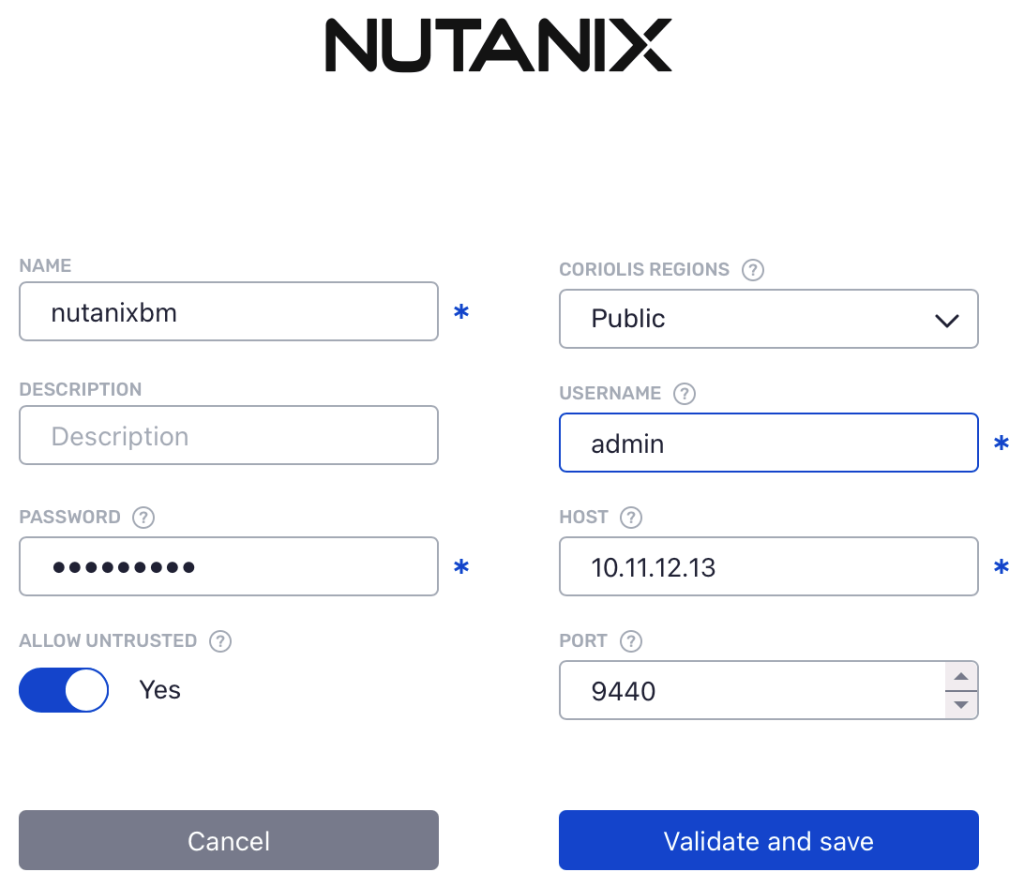
Each parameter represents:
name - an arbitrary user-defined name for this endpoint
username - Nutanix Prism Central username
password - Nutanix Prism Central password
host - Nutanix Prism Central host address
port - the port used by Nutanix Prism Central
allow untrusted - whether to allow untrusted TLS certificates when contacting Prism Central
Migrating (CMaaS) from Nutanix
Transfer Migrations from Nutanix operate in the same way Transfer Replicas do and thus entail the same requirements and steps described below.
Replicating (DRaaS) from Nutanix using Coriolis-based exports:
Requirements:
Please consider reviewing the general steps recommended to be performed before creating and executing a replica of an instance from Nutanix here.
Steps performed by Coriolis
create a vm recovery point (snapshot)
create a temporary volume group, used to expose the snapshots via iSCSI
create temporary volume disks, specifying the recovery point as data source reference
it doesn’t involve data copy operations, being executed instantly
mount the iSCSI target and identify the LUNs on the Coriolis worker side
stream the data to the destination cloud
cleanup the iSCSI session and the temporary recovery point
Note that open-iscsi is used to establish iSCSI sessions and the logs are available through the Coriolis web interface.
OSMorphing steps taken when migrating from Nutanix
The following notable steps will be performed as part of the OSMorphing process when migrating/replicating an instance away from Nutanix:
Linux
uninstall the Nutanix guest tools
rebuild initrd on RHEL-based systems
Windows
uninstall the Nutanix guest tools
Nutanix source environment parameters
The source environment parameters are a set of source-cloud-specific parameters that offer some extra options to the migration/replication process on a per-VM basis.
Below is a listing of the source environment parameters the Nutanix plugin supports when migrating/replicating a VM from Nutanix:
application_consistent_snapshot (boolean) - whether or not to create an application-consistent snapshot by coordinating with guest services such as VSS. The guest services will be notified that a backup is about to be performed, allowing them to flush their buffers and ensure the consistency of the data stored on disk.
verify_disk_integrity (boolean) - Whether or not to compute source-side checksums and validate the data received on the destination side.
JSON endpoint connection parameters
For automation and integration, here is the JSON form:
{
  "host": "10.11.12.13",
  "port": 9440,
  "username": "admin",
  "password": "SuperSecretPassword",
  "allow_untrusted": true
}
Nutanix platform specifics
Supported Actions: |
Migration (CMaaS) Source/Destination – Replica (DRaaS) Source/Destination |
Comments |
|---|---|---|
Plugin identifier |
nutanix |
Identifies the plugin. Used for the –provider CLI parameter |
Credentials needed |
Nutanix Prism Central address and credentials. |
|
Deployment requirements |
Coriolis worker component(s) need network access to the Nutanix Prism Central API endpoint as well as the Nutanix iSCSI portal. |
Coriolis deployment and environment connectivity requirements |
Instance identification scheme |
By name or ID. |
How instances to migrate/replicate are identified on a source cloud handled by this plugin |
Known issues and limitations
Incremental transfers
The Nutanix plugin does not support incremental transfers yet. The community edition (v2.1) has been used for testing and development purposes, however it does not include the Nutanix CBT API.
The next community edition (late 2026) is expected to have AOS >= 7.3 and CBT functionality, at which point this feature may be implemented in Coriolis. In the meantime, the Nutanix plugin will always perform full transfers.