
Nutanix#
Coriolis integrates the platform Plugin on the Appliance itself, this way there is no need for agents to be deployed on platforms to establish the communication between the platform and the Coriolis components. Using this type of architecture, Coriolis guarantees the connection to the supported platform set up to be used as either Source or Destination, as long as the requirements are met.
Deployment requirements#
The worker components of Coriolis need network access to theNutanix Prism Central API, as well as the Nutanix iSCSI portal used when retrieving disk data.
Note that Prism Central isn’t included by default in the latest community edition (2.1), it’s an optional component that must be enabled manually.
Version requirements#
Component |
Version requirement |
|---|---|
Nutanix API |
4.0 |
Nutanix AOS |
>= 6.8 |
Nutanix Prism Central |
>= 7.3 |
Nutanix endpoint connection parameters#
Coriolis requires the following connection parameters to access Nutanix Prism Central and migrate resources:
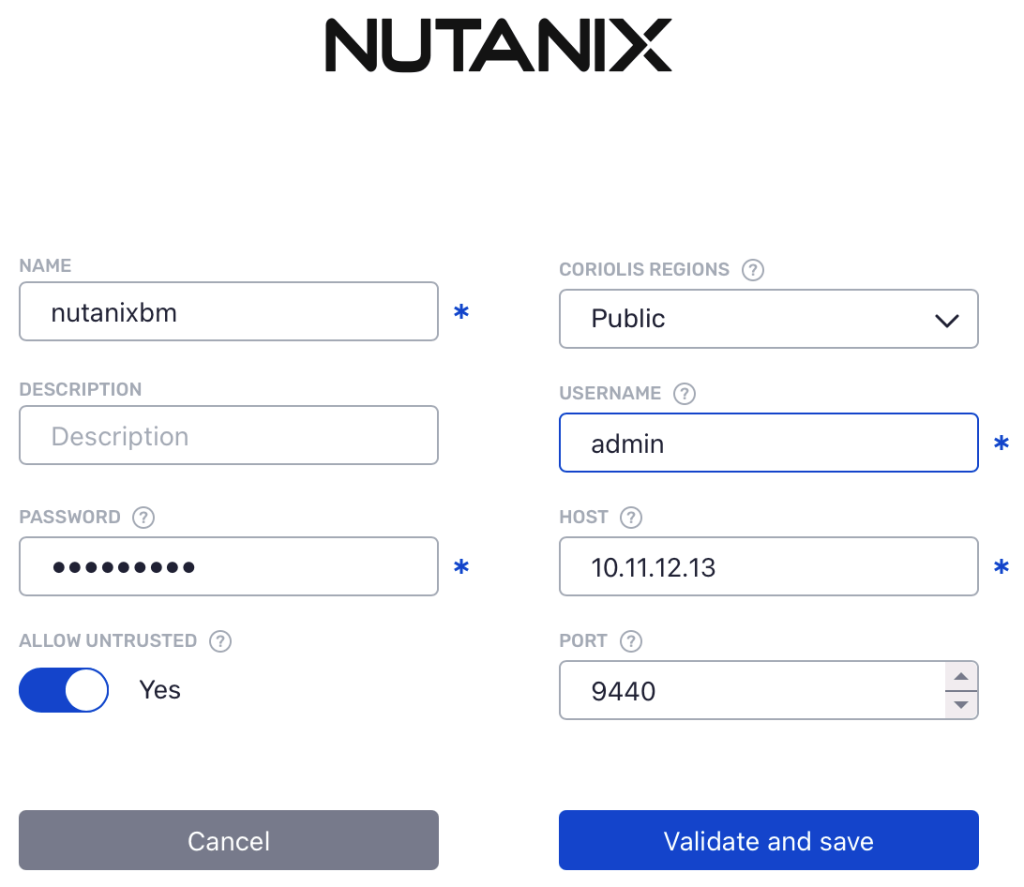
Each parameter represents:
name - an arbitrary user-defined name for this endpoint
username - Nutanix Prism Central username
password - Nutanix Prism Central password
host - Nutanix Prism Central host address
port - the port used by Nutanix Prism Central
allow untrusted - whether to allow untrusted TLS certificates when contacting Prism Central
Nutanix platform specifics#
Supported Actions: |
Migration (CMaaS) Source/Destination – Replica (DRaaS) Source/Destination |
Comments |
|---|---|---|
Plugin identifier |
nutanix |
Identifies the plugin. Used for the –provider CLI parameter |
Credentials needed |
Nutanix Prism Central address and credentials. |
|
Deployment requirements |
Coriolis worker component(s) need network access to the Nutanix Prism Central API endpoint as well as the Nutanix iSCSI portal. |
Coriolis deployment and environment connectivity requirements |
Instance identification scheme |
By name or ID. |
How instances to migrate/replicate are identified on a source cloud handled by this plugin |
Nutanix as a source cloud#
For more information on using Nutanix as a source cloud for Replica/Migration, please check the Nutanix as a source cloud page.