
SUSE Linux (KVM) as a destination cloud#
Migrating to SUSE Linux (KVM)#
When using SUSE Linux as a KVM-based virtualization platform, Coriolis integrates with each KVM host through libvirt, which is the management library and API used to control KVM/QEMU environments.
Coriolis connects to the libvirt service through SSH(TCP/22) on each SUSE Linux KVM host to perform the operations required during migration workflows. In this design, each SUSE Linux KVM host must expose a functional libvirt endpoint that Coriolis can reach and authenticate against.
Note
Migration to SUSE Linux on KVM applies to standard virtual machines only. SAP HANA workloads require a separate licensing model and endpoint, which provide SAP HANA-specific configuration options needed to meet performance, support, and compliance requirements.
See the SAP HANA SKU document for more details.
Transfer executions#
Steps performed by Coriolis#
If this is the first execution of the VM transfer, create empty storage volumes on the destination Libvirt host, each matching the size of a disk the VM had on the source. If this is a later replica execution, update the existing volumes — resizing any that have grown on the source and deleting any that no longer exist.
Create a temporary worker VM (minion machine) on the destination Libvirt host, booting from the worker image specified. The worker VM receives its SSH key and metadata via a cloud-init config drive using the no-cloud metadata format.
Once the worker VM is running and reachable, hot-attach the replica volumes to it.
Read disk data from the source and stream it to the worker VM’s backup writer service, which writes the data to the replica volumes at the correct offsets.
Once all disk contents have been transferred, stop and delete the worker VM.
Transfer deployment#
Steps performed by Coriolis#
Optionally, clone the transferred volumes to produce a clean set of volumes as the starting point for deployment, leaving the originals intact in case of a rerun.
Create a temporary worker VM (OS morphing minion) and hot-attach the replica volumes to it.
Perform the OS morphing process: the morphing worker scans the attached disks for the OS installation of the VM being migrated, mounts it, and applies the steps needed to integrate it for the KVM/Libvirt platform.
Detach the migrated volumes and delete the OS morphing worker VM.
Create the final VM in Libvirt using a generated domain XML built using the settings specified during the migration.
Temporary worker image for migration#
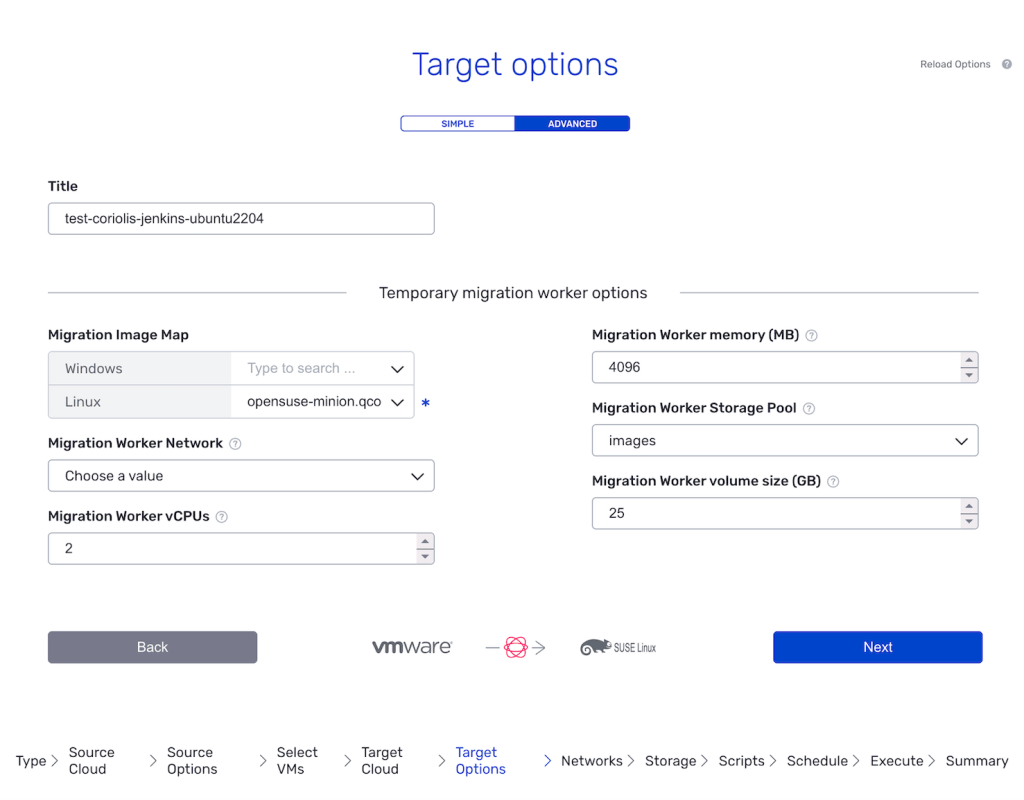
When running a migration to Libvirt, Coriolis uses temporary worker VMs to receive disk data and perform OS morphing. The images for these worker VMs must be pre-staged as volumes in a dir-type Libvirt storage pool on the destination host, and referenced by volume name in the Temporary worker target environment option.
Worker images must have a standard initialisation agent installed and configured for first boot:
Linux – cloud-init and qemu-guest-agent
Windows – cloudbase-init, virtIO drivers, and the qemu guest agent
The instructions below describe the process of setting up the Windows worker image:
Freshly install Windows in a KVM virtual machine.
Install Cloudbase-Init, without running sysprep from the installation wizard.
Edit the Cloudbase-Init configuration file (typically C:\Program Files\Cloudbase Solutions\Cloudbase-Init\conf\cloudbase-init.conf) to match the following:
[DEFAULT]
username=Admin
groups=Administrators
inject_user_password=true
config_drive_raw_hhd=true
config_drive_cdrom=true
config_drive_vfat=true
bsdtar_path=C:\Program Files\Cloudbase Solutions\Cloudbase-Init\bin\bsdtar.exe
mtools_path=C:\Program Files\Cloudbase Solutions\Cloudbase-Init\bin\
verbose=true
debug=true
log_dir=C:\Program Files\Cloudbase Solutions\Cloudbase-Init\log\
log_file=cloudbase-init.log
default_log_levels=comtypes=INFO,suds=INFO,iso8601=WARN,requests=WARN
logging_serial_port_settings=COM1,115200,N,8
mtu_use_dhcp_config=true
ntp_use_dhcp_config=true
local_scripts_path=C:\Program Files\Cloudbase Solutions\Cloudbase-Init\LocalScripts\
check_latest_version=false
metadata_services=cloudbaseinit.metadata.services.configdrive.ConfigDriveService,cloudbaseinit.metadata.services.httpservice.HttpService
plugins=cloudbaseinit.plugins.common.mtu.MTUPlugin,cloudbaseinit.plugins.windows.ntpclient.NTPClientPlugin,cloudbaseinit.plugins.common.sethostname.SetHostNamePlugin,cloudbaseinit.plugins.windows.extendvolumes.ExtendVolumesPlugin,cloudbaseinit.plugins.windows.winrmlistener.ConfigWinRMListenerPlugin,cloudbaseinit.plugins.common.userdata.UserDataPlugin
Save the configuration and start a sysprep process, then shut down the Windows VM.
Place the resulting QCOW2 disk image in a dir-type Libvirt storage pool on the destination host.
For more information regarding the Coriolis Worker image, please check the Coriolis Temporary Migration Worker page.
OSMorphing steps#
Depending on the OS being migrated, the following notable steps are performed as part of the OSMorphing process:
Linux#
Installing cloud-init
Installing qemu-guest-agent (where supported by the distribution)
Rebuilding initramfs to include VirtIO drivers (update-initramfs on Debian/Ubuntu; dracut on RedHat-based distributions)
Configuring network interfaces for DHCP (where set_dhcp = true)
Setting SELinux autorelabel flag (RedHat-based distributions)
Windows#
Downloading the VirtIO driver ISO and injecting the drivers.
Downloading and installing Cloudbase-Init
Configuration options#
Below is a listing of the configuration section needed when migrating to SUSE Linux (KVM):
[libvirt_migration_provider]

# Name of the Libvirt storage pool to be used for volumes with unspecified
# storage backing option from the source or which could not be mapped in
# the "storage_mappings".
default_storage_pool =

# Default image paths used for worker instances during migrations.
# Format: key:value,key2:value2
migr_image_map =

# The integer size (in GBs) of the volume to boot temporary worker VMs from.
migr_worker_volume_size = 25

# The amount of memory (in MBs) to allocate to temporary worker VMs.
migr_worker_memory = 4096

# The amount of vcpus to allocate to temporary worker VMs.
migr_worker_vcpus = 2

# The name of an existing Libvirt network used for worker VMs.
migr_worker_network =

# What mechanism to use when sending disk data to the temporary VMs.
# Choices: https, ssh
data_transfer_mechanism = https

# Write the VM serial console output to a file.
enable_vm_console_log = true

# The directory used to store console log files on the Libvirt host.
vm_console_log_dir = /var/log/libvirt/qemu

# Attach a VNC console to the VM. Port is selected automatically.
enable_vm_vnc_console = false

# The VNC listen address.
vnc_listen_address = 0.0.0.0

# URL to a .iso file containing the Windows VirtIO drivers.
windows_virtio_iso_url = https://fedorapeople.org/groups/virt/virtio-win/direct-downloads/stable-virtio/virtio-win.iso

# Whether or not to configure the VM to use DHCP during OSMorphing.
set_dhcp = true

# Whether or not to use config drive to send metadata to the migrated instance.
use_config_drive = false

# Whether or not Coriolis should reconfigure cloud-init during OSMorphing
# to preserve existing user credentials, SSH auth, and keypairs.
retain_user_credentials = true

# CPU mode to use for Libvirt domains (e.g. 'host-passthrough', 'host-model').
# When empty, Libvirt's default behaviour is used.
cpu_mode = host-passthrough

# Disable CPU features that would prevent the VM from being live migrated.
cpu_migratable = true

# Optional list of CPU feature names to require on created domains.
cpu_features = rdtscp,invtsc,x2apic

# Source used to retrieve IP addresses from the migration worker VM.
# Choices: agent, lease, arp
migr_worker_iface_addr_src = agent

# The path of the SSH key used when connecting to Libvirt hosts.
ssh_key_path =

# The location of the SQLite database file for backend-specific data.
sqlite_database_file = /opt/coriolis/libvirt_provider_db.sqlite

# Attach a persistent TPM device to replica instances.
add_tpm_device = true
Libvirt host prerequisites#
Storage pool#
The provider relies on Libvirt storage pools, allowing it to transparently use a variety of storage backends: local directory, Ceph, LVM, etc.
Note that the minion VM image is expected to reside in a “directory” storage pool. To speed up minion VM deployments, the provider will create QCOW2 images pointing to the specified image.
Create a directory storage pool like so:
pool_name=local-dir-pool
pool_path=/var/lib/libvirt/local-dir-pool

sudo virsh pool-define-as \
  --name $pool_name \
  --type dir \
  --target $pool_path

sudo mkdir -p $pool_path
sudo chown -R libvirt-qemu:kvm $pool_path
sudo chmod 755 $pool_path
sudo virsh pool-start $pool_name
sudo virsh pool-autostart $pool_name
Then copy the desired minion image to that directory. When initiating transfers, the user will be prompted to select an image from that location.
Networks#
The minion VM network is expected to have DHCP enabled and be accessible from the appliance side.
This example uses the br1 bridge, which must be pre-configured:
cat > br1-network.xml <<EOF
<network>
  <name>br1-network</name>
  <forward mode='bridge'/>
  <bridge name='br1'/>
</network>
EOF

virsh net-define br1-network.xml
virsh net-start br1-network
virsh net-autostart br1-network
SR-IOV#
The Libvirt Coriolis provider can assign SR-IOV VFs to replica instances.
Follow this guide to configure a hostdev Libvirt network, which can then
be passed to Coriolis transfers.
Host configuration#
First, enable SR-IOV and VT-d in the BIOS configuration.
Then add the following to the list of kernel parameters to allow VM passthrough devices:
intel_iommu=on iommu=pt
Some devices may not be mapped correctly and also require the following:
pci=realloc pci=assign-busses
Preallocate the desired number of VFs:
echo 8 > /sys/class/net/p1p1/device/sriov_numvfs
To make the VFs persistent, consider using a Systemd service or Netplan configuration, depending on the Linux distribution.
Libvirt network#
Libvirt networks can be configured to expose SR-IOV VFs to the connected VMs.
Set the forward mode to hostdev and enable managed mode to automatically
pick a VF. Then specify the desired PF to expose.
cat > vfio-p1p1-network.xml <<EOF
<network>
  <name>vfio-p1p1</name>
  <forward mode='hostdev' managed='yes'>
    <pf dev='p1p1'/>
  </forward>
</network>
EOF

virsh net-define vfio-p1p1-network.xml
virsh net-start vfio-p1p1
virsh net-autostart vfio-p1p1
Guest configuration#
The migrated VM needs to include the according VF interface drivers, which can be handled through user scripts during OS morphing.